

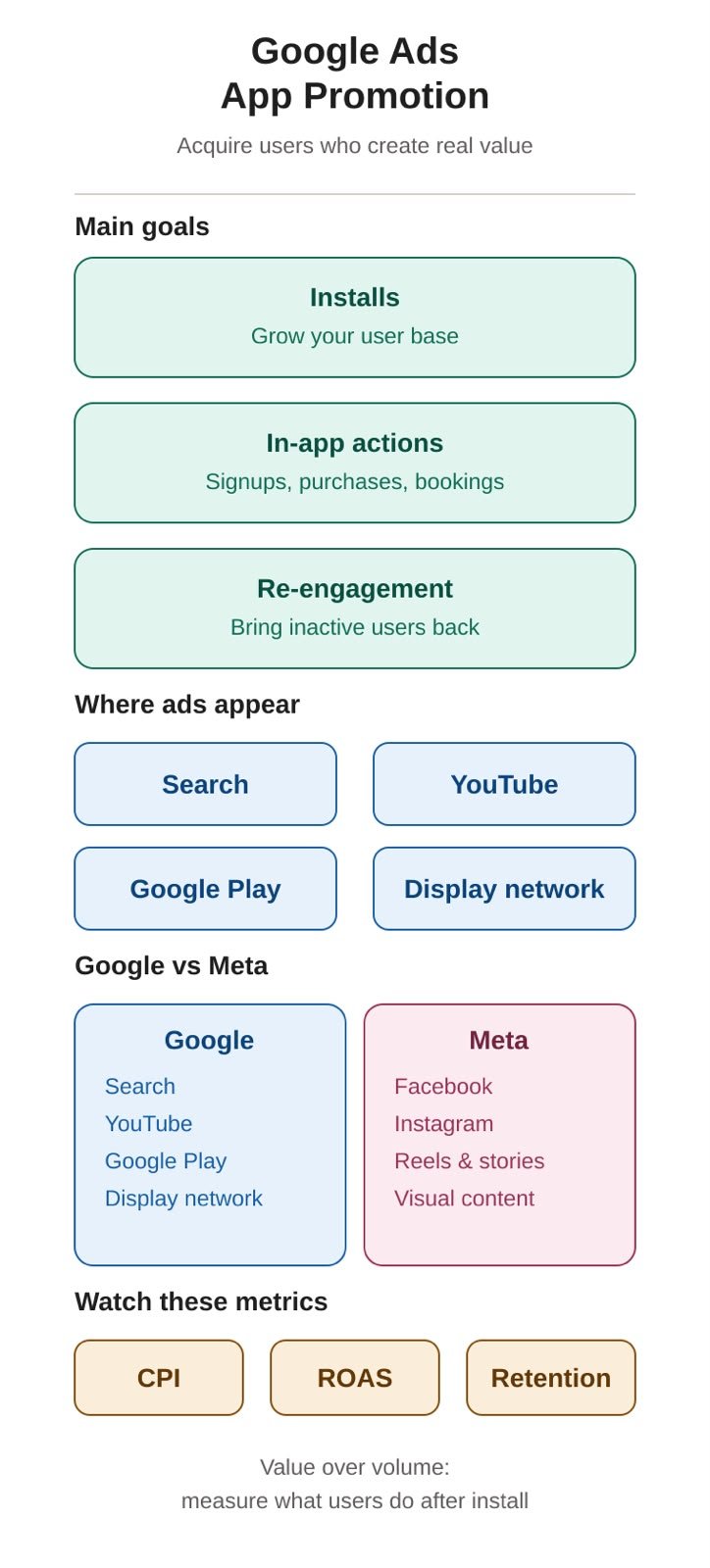
What Is Google Ads App Promotion?
With the increasing use of smartphones, mobile applications have become an essential channel for businesses to reach customers, provide services, sell products, and build long-term relationships with their audiences.
However, simply launching an application does not guarantee that people will download or use it.
This is where Google Ads App Promotion can play an important role.
Google Ads App Promotion is designed to help businesses and app developers promote their mobile applications and reach potential users. Depending on the campaign objective, advertisers can focus on generating more app installations, increasing engagement, or encouraging users to complete valuable actions inside the application.
These actions may include:
- Installing the application.
- Creating an account.
- Making a purchase.
- Booking a service.
- Subscribing to a service.
- Completing a specific action.
- Returning to an application they previously installed.
The main idea is not simply to generate downloads, but to acquire users who can provide real value to the business.
Where Can Google App Promotion Ads Appear?
One of the main advantages of Google Ads is its large advertising ecosystem.
Depending on the campaign and its settings, app promotion ads can reach users across different Google properties and advertising environments, including:
- Google Search.
- Google Play.
- Google Display Network.
- Other Google advertising placements.
This allows advertisers to reach potential users at different stages of their decision-making journey.
For example, someone searching for a specific type of service may encounter an application that solves their problem. Another user may discover the application while watching related content on YouTube or browsing Google Play.
How Does Google App Promotion Work?
Google App Promotion relies heavily on automation and machine learning.
Instead of manually creating separate campaigns for every possible placement, advertisers provide Google with important campaign information and creative assets.
These can include:
- App information.
- Text assets.
- Campaign objectives.
- Target locations.
- Conversion goals.
Google then uses its systems to determine where and when the ads should be shown and which users are more likely to complete the desired action.
This makes the campaign objective extremely important.
If the objective is simply to generate installations, the system will try to find users who are likely to install the application.
If the objective is to generate purchases, the campaign can be optimized toward users who are more likely to complete a purchase.
Main Goals of App Promotion
1. Increasing App Installations
One of the most common objectives is increasing the number of people who install an application.
This can be particularly useful for:
- Newly launched applications.
- Applications entering a new market.
- Businesses trying to increase their user base.
- Applications with a large potential audience.
However, advertisers should remember that an installation does not necessarily mean that the user will become a valuable customer.
2. Increasing In-App Actions
A successful application campaign should not necessarily stop at generating installations.
Businesses may want users to perform specific actions after installing the application, such as:
- Creating an account.
- Making a purchase.
- Booking an appointment.
- Adding products to a cart.
- Requesting a service.
Optimizing toward these actions can provide a better understanding of the actual value generated by advertising.
3. Re-Engaging Existing Users
Some campaigns can also focus on users who have already installed an application.
For example, an e-commerce application may have users who downloaded the app but never completed a purchase.
Advertising can be used to encourage these users to return and complete an important action.
Important Guidelines Before Launching Google App Promotion
Launching an app campaign is not simply about choosing a budget and pressing the publish button.
There are several important factors advertisers should consider before launching.
1. Define Your Campaign Objective
Before creating the campaign, clearly define what you want to achieve.
Ask: What is the most valuable result for my business?
Is it:
- More installations?
- More registrations?
- More purchases?
- More bookings?
- More subscriptions?
- More active users?
Your objective should be connected to the business model.
For example, if an application generates revenue through purchases, thousands of low-quality installations may be less valuable than a smaller number of users who actually purchase.
2. Set Up Conversion Tracking Correctly
Conversion tracking is one of the most important parts of app advertising.
Before launching your campaign, make sure you can measure what happens after a user interacts with your advertisement.
For example:
Ad → App Install → Registration → Add to Cart → Purchase
This allows advertisers to understand not only how many people installed the application, but also what those users did afterward.
Accurate conversion data can also help Google’s automated systems optimize campaigns toward the desired outcomes.
3. Do Not Focus Only on Downloads
Downloads are an important metric, but they should not always be the final KPI.
For example, imagine a campaign generates:
10,000 app installations
That may sound impressive, but if only a small percentage of those users become customers, the campaign may not be generating the expected business value.
Important metrics can include:
- Cost Per Install (CPI).
- Cost Per Registration.
- Cost Per Purchase.
- Conversion Rate.
- Return on Ad Spend (ROAS).
- User Retention.
- Customer Lifetime Value.
The most important metric depends on the business model and campaign objective.
4. Prepare Multiple Creative Assets
Do not rely on a single image or video if you can prepare several variations.
Consider preparing:
- Multiple videos.
- Different images.
- Different headlines.
- Different descriptions.
- Different calls to action.
Video concepts can include:
- A demonstration of the application.
- A problem-and-solution concept.
- A product demonstration.
- A user experience.
- A special offer.
- A tutorial.
- A short explanation of the application’s main benefit.
Providing different creative assets gives the advertising system more options to test different combinations.
5. Communicate the App’s Value Quickly
Users do not need to understand every feature of an application from one advertisement.
The ad should quickly communicate three important things:
- What is the problem?
- How does the application solve it?
- Why should the user download it?
For example, instead of simply saying:
“Download our app now.”
A food delivery application could communicate a clearer benefit:
“Order your favorite meals from one app and get them delivered to your door.”
The focus should be on the value of the application, not simply announcing that the application exists.
6. Define Your Target Market
Before launching the campaign, clearly identify the market you want to reach.
Consider:
- City or region.
- Operating system.
- Age group.
- Customer profile.
- Purchasing power.
- Customer needs.
- App availability.
You should also make sure that your application is actually available to users in the locations you are targeting.
7. Set a Realistic Budget
Your advertising budget should be connected to the value of the customer.
For example, if an average customer generates $20 in profit, you need to understand how much you can reasonably spend to acquire that customer while maintaining profitability.
This is why advertisers should avoid judging a campaign only by the cheapest installation.
A campaign with a higher Cost Per Install can still generate stronger business results if those users are more likely to purchase.
8. Avoid Making Constant Changes
App campaigns rely heavily on automation and machine learning.
For this reason, advertisers should avoid making large and frequent changes without a clear reason.
Constantly changing:
- Campaign objectives.
- Creative assets.
- Other major settings.
can make it more difficult to understand what is actually affecting performance.
Instead, monitor the data and make changes based on clear performance signals.
9. Test Different Creative Angles
If your Cost Per Install or Cost Per Purchase is high, do not immediately assume that the audience or platform is the problem.
The creative may be the issue.
Consider testing different angles, such as:
- A specific customer problem.
- A unique feature.
- Customer testimonials.
- User-generated content.
- Before-and-after experiences, where appropriate.
- Special offers.
Different audiences may respond to different messages.
10. Monitor User Quality
This is one of the most important principles in app marketing.
Do not only ask:
“How many users did we acquire?”
Also ask:
“What did those users do after installing the app?”
For example:
| Metric | Question |
| Downloads | How many people installed the app? |
| Registration | How many users created an account? |
| Purchase | How many users purchased? |
| Revenue | How much revenue was generated? |
| Retention | How many users continued using the app? |
| ROAS | How much revenue was generated compared with ad spend? |
This approach allows businesses to evaluate campaigns based on user value rather than installation volume alone.
Google App Promotion vs. Meta App Promotion
When discussing app advertising, one of the most common comparisons is between Google Ads and Meta Ads.
Both platforms can help businesses acquire app users, but they provide access to users through different ecosystems.
Google App Promotion
Google App Promotion operates across Google’s advertising ecosystem, including environments such as Search, YouTube, Google Play, and the Google Display Network.
This means users can discover an application while:
- Searching for information.
- Watching videos.
- Browsing Google Play.
- Interacting with content across Google’s advertising network.
Meta App Promotion
Meta’s advertising ecosystem primarily includes platforms such as:
Meta provides a highly visual environment where advertisers can use videos, images, Reels, Stories, and other creative formats to introduce applications to potential users.
Key Differences Between Google App Promotion and Meta App Promotion
| Factor | Google App Promotion | Meta App Promotion |
| Main ecosystem | Meta | |
| Google Search | Yes | No |
| Google Play | Yes | No |
| YouTube | Yes | No |
| No | Yes | |
| No | Yes | |
| Main discovery environments | Search, video, apps, and Google properties | Social media and visual content |
| App installations | Yes | Yes |
| In-app actions | Yes | Yes |
| Automation | High | High |
| Creative importance | Important | Very important |
| Visual content | Important | Especially important |
The main difference is not necessarily that one platform is universally better than the other.
Instead, each platform provides access to users through a different environment.
Google can reach people across search, YouTube, Google Play, and its broader advertising ecosystem, while Meta focuses heavily on social discovery and visual content across Facebook and Instagram.
Should You Use Google or Meta for App Promotion?
There is no single platform that is suitable for every application.
The right strategy depends on factors such as:
- The type of application.
- The target audience.
- The business model.
- The campaign objective.
- The available budget.
- The customer acquisition cost.
- The expected customer value.
In some cases, Google may provide valuable access to users through Search, YouTube, and Google Play.
In other cases, Meta may provide strong opportunities to introduce an application through visual content and social discovery.
Businesses can also use both platforms and compare their performance based on meaningful business metrics rather than simply comparing the number of installations.
How to Measure the Success of an App Campaign
A successful app campaign should be evaluated using metrics that reflect the actual business objective.
For example, an e-commerce application may focus on:
- Cost Per Purchase.
- Customer Lifetime Value.
A subscription application may focus on:
- Free trials.
- Paid subscriptions.
- Cost Per Subscriber.
Meanwhile, an application that is still building its user base may initially focus more heavily on installations and user acquisition.
The key is to connect advertising metrics to actual business results.
Google Ads App Promotion provides businesses with an effective way to promote mobile applications and acquire new users across Google’s advertising ecosystem.
However, successful app advertising requires more than simply launching a campaign.
Advertisers should define a clear objective, implement accurate conversion tracking, prepare a variety of creative assets, identify the right market, establish a realistic budget, and continuously evaluate the quality of acquired users.
Most importantly, advertisers should avoid measuring success based solely on the number of downloads.
A successful campaign should ultimately help the business acquire users who create measurable value.
When comparing Google App Promotion with Meta App Promotion, businesses should consider the differences between the two ecosystems, the behavior of their target audience, the type of application, and the desired business outcome.
The strongest strategy is one based on clear objectives, accurate measurement, creative testing, and data-driven optimization.






Related Posts