

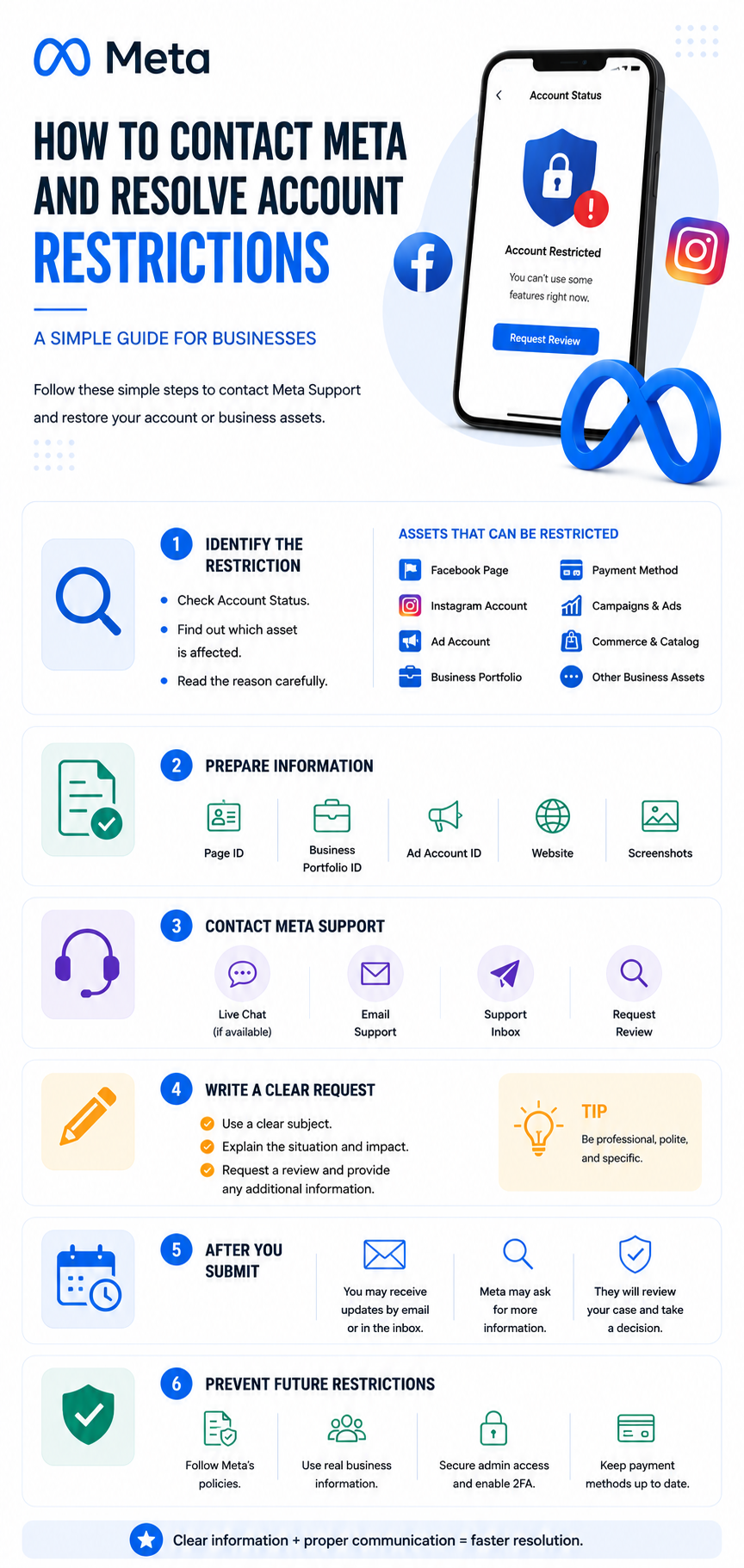
Meta platforms, including Facebook and Instagram, have become essential tools for businesses, brands, advertisers, and digital marketers around the world. From running advertising campaigns to managing Facebook Pages, Instagram accounts, catalogs, and Business Portfolios, businesses rely heavily on Meta’s ecosystem to reach their audiences and generate results.
However, one of the most frustrating situations for businesses is suddenly discovering that a Facebook Page, Instagram account, advertising account, Business Portfolio, or another Meta asset has been restricted.
A restriction can affect your ability to publish content, launch advertisements, manage business assets, access certain features, or connect Facebook and Instagram accounts. In some cases, the reason for the restriction may not be immediately clear, making it difficult for businesses to understand what went wrong or how to resolve the issue.
The good news is that many Meta restrictions can be reviewed and, depending on the situation, removed after the account or business owner provides the necessary information and completes the appropriate review process.
This guide explains how Meta restrictions work, why they happen, how to identify the affected asset, how to contact Meta Support, what information to prepare, and what steps businesses should take to improve their chances of resolving the issue.
What Is a Meta Restriction?
A Meta restriction is a limitation placed on a Facebook, Instagram, advertising, or business-related asset because Meta’s systems have detected activity that may violate its policies, security requirements, or platform standards.
Restrictions can affect different parts of a business account. For example, a company may have:
- A restricted Facebook Page
- A restricted Instagram account
- A disabled advertising account
- A restricted Business Portfolio
- A disabled payment method
- Advertising restrictions on specific campaigns or ads
- Restrictions on certain business features
- Problems connecting Facebook and Instagram
- Problems assigning people or partners to business assets
- Issues accessing or managing a Page
- Commerce or catalog restrictions
One of the most important steps is identifying exactly which asset is restricted.
A business may assume that its Facebook Page is restricted when the actual problem is with the Business Portfolio that owns the Page. Similarly, an advertising problem may appear to be related to a campaign while the underlying issue is actually an advertising account restriction.
Understanding the source of the restriction is the first step toward solving it.
Why Does Meta Restrict Accounts and Business Assets?
Meta uses automated systems and manual reviews to monitor activity across its platforms. These systems evaluate different signals related to advertising, account behavior, payments, business information, security, and policy compliance.
There are many possible reasons for a restriction.
1. Advertising Policy Violations
One of the most common causes is advertising content that Meta believes violates its Advertising Standards.
This can include issues related to:
- Misleading claims
- Before-and-after imagery
- Personal attributes
- Health-related claims
- Financial products
- Restricted products or services
- Inappropriate landing pages
- Misleading offers
- Prohibited content
- Low-quality user experiences
Sometimes, an advertiser may unintentionally violate a policy without realizing it.
2. Suspicious or Unusual Activity
Meta may restrict an account when its security systems detect activity that appears unusual.
Examples may include:
- Sudden changes in account behavior
- Multiple login locations
- Suspicious login attempts
- Unrecognized devices
- Unusual advertising activity
- Rapid changes to business settings
- Unexpected payment activity
These restrictions are sometimes security-related rather than directly related to advertising content.
3. Payment Problems
Payment issues can also lead to advertising restrictions.
Potential problems include:
- Failed payments
- Expired cards
- Payment disputes
- Unusual payment activity
- Problems with the payment method
- Outstanding balances
- Multiple failed billing attempts
Because advertising accounts are connected to payment systems, unresolved billing problems can sometimes affect the ability to run campaigns.
4. Business Verification Problems
Meta may require businesses to provide information to verify their identity or business details.
This can include:
- Business name
- Legal business information
- Business address
- Website
- Business documents
- Contact information
If information submitted to Meta is inconsistent or cannot be verified, additional restrictions may occur.
Understanding the Difference Between Meta Assets
Before contacting Meta Support, it is important to understand the different assets inside Meta’s ecosystem.
A typical business setup may include:
Facebook Page
The public-facing Facebook presence of the business.
Instagram Account
The brand’s Instagram profile, which can be connected to the Facebook Page.
Ad Account
The account used to create and manage paid advertising campaigns.
Business Portfolio
The business environment where assets such as Pages, Instagram accounts, ad accounts, pixels, catalogs, and people can be managed.
Meta Pixel / Dataset
Used to measure website activity and track events such as PageView, ViewContent, AddToCart, InitiateCheckout, and Purchase.
Catalog
Used to manage products for advertising and commerce features.
A restriction on one asset does not necessarily mean that every asset is restricted.
For example, a Page may still be visible to the public while its Business Portfolio has restrictions that prevent certain administrative actions.
How to Check What Is Restricted
Before contacting Meta, start by reviewing the account’s available notifications and account status information.
Depending on the type of issue, you may need to check areas such as:
- Account Status
- Business Support Home
- Ads Manager
- Events Manager
- Business Settings
- Page Settings
- Instagram Account Status
- Payment Settings
- Security notifications
Look carefully at the exact wording of the restriction.
Do not rely only on a general message such as:
“Your account has been restricted.”
Try to determine:
- Which asset is affected?
- What action is blocked?
- What reason did Meta provide?
- Is there an option to request a review?
- Is the restriction temporary or permanent?
- Is there a specific policy mentioned?
- Is there a Business Portfolio involved?
- Is the issue related to payment or security?
The more specific the information, the easier it is to communicate the problem to Meta Support.
How to Contact Meta Support
One of the most important steps in resolving a restriction is reaching the appropriate Meta Support channel.
Depending on the account and available support options, businesses may be able to access support through Meta’s business support interfaces.
The available support methods can vary depending on:
- Account history
- Business type
- Advertising activity
- Region
- Account eligibility
- Available support features
- Severity of the issue
Some businesses may see options such as:
- Live Chat
- Email Support
- Support Inbox
- Review Request
- Business Support
- Account Review
If a live support option is available, it can be particularly useful because you can communicate directly with a Meta representative and provide additional context.
What Information Should You Prepare Before Contacting Meta?
One of the biggest mistakes businesses make is contacting Meta Support without enough information.
Before opening a support case, prepare all relevant details.
1. Business Name
Provide the exact business or brand name.
2. Facebook Page Name
Include the exact Page name.
3. Page ID
If available, provide the Page ID.
A Page ID helps Meta Support identify the exact asset you are referring to.
4. Business Portfolio ID
If the issue involves a Business Portfolio, provide its ID.
This is especially important when the restriction affects ownership, permissions, or asset management.
5. Ad Account ID
If the issue concerns advertising, provide the relevant Ad Account ID.
6. Instagram Username
Include the Instagram username if the issue involves Instagram.
7. Screenshots
Screenshots can help demonstrate exactly what you are seeing.
Useful screenshots may include:
- Restriction notifications
- Account Status
- Business Settings
- Error messages
- Ads Manager
- Page access
- Instagram settings
- Review request screens
Screenshots should clearly show the problem without exposing unnecessary private information.
How to Write a Professional Meta Support Request
The quality of your support request matters.
Instead of sending a short message such as:
“My account is restricted. Please fix it.”
provide a structured explanation.
A professional support request should include:
1. A Clear Subject
Explain the problem in one sentence.
For example:
Request for Review of Business Portfolio Restriction
2. Explain the Situation
Describe what happened and when the issue started.
3. Identify the Affected Assets
List the Page, Instagram account, Ad Account, or Business Portfolio involved.
4. Explain the Business Impact
Explain how the restriction affects your business operations.
5. Request a Review
Politely ask Meta to review the restriction and clarify the reason if necessary.
6. Offer to Provide Documentation
Let the support representative know that you are willing to provide additional information if required.
Example of a Professional Meta Support Message
A clear support request could look like this:
Hello Meta Support Team,
I am contacting you regarding a restriction affecting our business assets on Meta.
The issue is affecting our ability to properly manage and access our business assets, including our Facebook Page, Instagram account, and/or Business Portfolio.
We would appreciate it if your team could review the restriction and identify the exact reason behind it.
Business Name: [Business Name]
Facebook Page: [Page Name]
Page ID: [Page ID]
Instagram Account: [Instagram Username]
Business Portfolio ID: [Business Portfolio ID]
Ad Account ID: [Ad Account ID]
We believe that the affected assets are being used for legitimate business purposes and that we are committed to complying with Meta’s policies and requirements.
If any additional verification, documentation, or corrective action is required from our side, please let us know and we will provide it.
We kindly request a manual review of the restriction and assistance in restoring the affected business functions.
Thank you for your assistance.
What If the Restriction Is Related to Business Portfolio Ownership?
This is an important situation that many businesses encounter.
Sometimes, a Facebook Page or Instagram account is connected to a Business Portfolio that is controlled by another person or organization.
This can create serious management problems.
For example, a company may discover that:
- Another Business Portfolio owns the Page
- A previous employee has administrative access
- An old agency still has access
- The business cannot remove another administrator
- The current team does not have full control
- Instagram cannot be connected correctly
- Business assets are assigned to the wrong portfolio
In these situations, the problem may not be a simple Page restriction.
It may actually be an ownership or Business Portfolio access issue.
The support request should therefore clearly explain:
- Who owns the business
- Which Business Portfolio currently owns the asset
- Who currently has access
- What access the legitimate business owner has
- Why the current ownership is incorrect
- What action you are requesting from Meta
Providing evidence of legitimate business ownership may be important during the review.
What Evidence Can Help With a Meta Review?
Depending on the situation, Meta may request additional information.
Potential supporting evidence can include:
- Business registration documents
- Company information
- Official website
- Business email
- Screenshots
- Advertising account information
- Proof of business ownership
- Identification documents when specifically requested by Meta
- Information showing the relationship between the business and the Page
The exact requirements depend on the case.
It is important to provide accurate and legitimate information only.
Never submit fake documents or misleading information in an attempt to bypass a restriction.
What Happens After You Contact Meta?
After opening a support case, Meta may:
- Review the account.
- Request additional information.
- Ask you to complete a verification process.
- Escalate the case to another team.
- Remove the restriction.
- Maintain the restriction if a policy violation is confirmed.
- Provide additional instructions.
The process can vary significantly between cases.
Some problems may be resolved relatively quickly, while more complex business ownership or policy cases can require additional investigation.
What If Meta Rejects the Review?
A rejected review does not always mean that the situation cannot be investigated further.
If you believe the restriction was applied incorrectly, review the available options in your account and support case.
Before submitting another request:
- Read the reason for rejection carefully.
- Identify the specific issue mentioned by Meta.
- Correct any genuine problem.
- Gather additional evidence.
- Provide a clearer explanation.
- Avoid submitting repeated requests containing the same information.
If a new review option is available, use it appropriately.
The goal should be to provide new, relevant information, rather than repeatedly submitting the same request.
Common Mistakes When Dealing With Meta Restrictions
Mistake 1: Creating Multiple New Accounts
Some advertisers immediately create a new Business Portfolio or Ad Account after receiving a restriction.
This can sometimes make the situation more complicated.
It is usually better to understand the original problem first.
Mistake 2: Sending Aggressive Messages
Being frustrated is understandable, but aggressive language rarely helps.
Support agents need clear information to investigate the case.
Keep the communication:
- Professional
- Specific
- Respectful
- Factual
- Organized
Mistake 3: Providing Incomplete Information
A message without IDs, screenshots, or an explanation can make it harder for the support team to identify the correct asset.
Mistake 4: Ignoring the Actual Reason
If Meta says the problem is related to payment, sending a long explanation about advertising content may not solve the issue.
Always focus on the specific reason shown in the account.
Mistake 5: Making Unnecessary Changes
When an account is under review, constantly changing:
- Administrators
- Payment methods
- Business information
- Pages
- Ad Accounts
- Business ownership
can make the situation more difficult to understand.
Make changes only when they are necessary and appropriate.
How to Reduce the Risk of Future Meta Restrictions
Prevention is always better than trying to recover a restricted account.
Businesses should establish proper account management procedures.
Use Real Business Information
Make sure the business name, website, contact information, and other business details are accurate and consistent.
Secure Administrator Accounts
Use strong passwords and enable two-factor authentication where available.
Limit Access
Only give business access to people who actually need it.
Remove former employees, agencies, and contractors when their work ends.
Review Advertising Policies
Before launching campaigns, make sure your advertising content complies with Meta’s policies.
Pay particular attention to sensitive industries and claims.
Maintain Payment Methods
Keep payment information accurate and monitor failed payments.
Keep Business Assets Organized
Make sure Pages, Instagram accounts, Ad Accounts, Pixels, catalogs, and other assets are assigned to the correct Business Portfolio.
Why Professional Account Management Matters
Meta account management is no longer simply about creating advertisements.
A professional digital marketing team needs to understand the entire ecosystem, including:
- Business Portfolios
- Facebook Pages
- Instagram accounts
- Ad Accounts
- Pixels
- Datasets
- Catalogs
- Permissions
- Payments
- Verification
- Policy compliance
- Account security
When these assets are not properly organized, a business can face significant operational problems.
For this reason, businesses should regularly audit their Meta accounts and make sure that ownership and access are correctly configured.
When Should You Contact Meta Support?
You should consider contacting Meta Support when:
- Your advertising account has been restricted.
- Your Facebook Page has an unexpected restriction.
- Your Instagram account has been restricted.
- You cannot access important business assets.
- A Business Portfolio is restricted.
- Your Page is owned by an incorrect Business Portfolio.
- You cannot manage administrators or permissions.
- Your advertising account is disabled.
- You are unable to connect Facebook and Instagram correctly.
- You are unable to request a review through the available interface.
- A technical problem continues after standard troubleshooting.
The earlier you understand the actual source of the problem, the easier it is to determine the appropriate solution.
Meta restrictions can be stressful, particularly when Facebook and Instagram are important sources of customers, leads, sales, or brand awareness.
However, reacting quickly without understanding the problem can sometimes make the situation more complicated.
The best approach is to identify the exact restricted asset, understand the reason for the restriction, collect the necessary information, and communicate with Meta Support in a professional and structured way.
Whether the issue involves an advertising account, Facebook Page, Instagram account, Business Portfolio, payment method, ownership problem, or another business asset, accurate information and proper documentation can make the review process much clearer.
Businesses should also focus on prevention by maintaining secure administrator access, accurate business information, compliant advertising content, and proper ownership of all Meta assets.
Ultimately, effective Meta account management is not only about running successful campaigns. It is also about maintaining a healthy, secure, and properly organized digital business infrastructure.
If a restriction occurs, the objective should not simply be to “remove the restriction.” The objective is to understand why it happened, resolve the underlying issue, and prevent the same problem from happening again.






Related Posts