

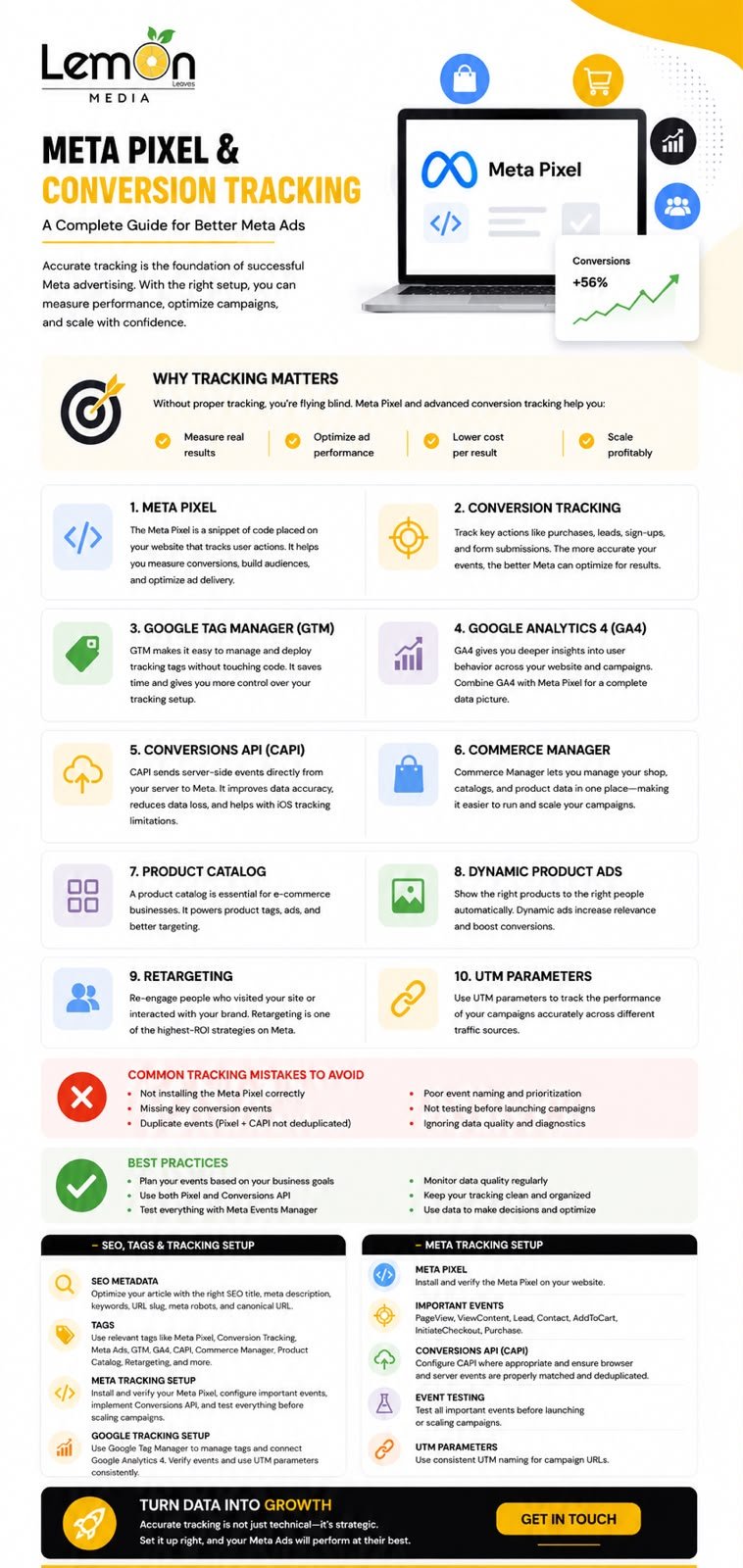
Running a Meta advertising campaign is only one part of a successful digital marketing strategy. The more important question is what happens after someone clicks on an ad.
Did they visit the website? Did they view a product? Did they submit a form? Did they add an item to their cart? Did they complete a purchase?
Without reliable tracking, businesses can struggle to understand which campaigns are generating meaningful results and which are simply generating clicks.
This is where Meta Pixel, Conversion Tracking, Google Tag Manager, Google Analytics 4, Meta Conversions API, and Commerce Manager become valuable. When these tools are configured correctly, they create a stronger measurement system that helps businesses understand customer actions, improve campaign optimization, and make better marketing decisions.
For businesses investing in paid advertising, tracking should not be treated as an optional technical step. It should be part of the campaign strategy from the beginning.
What Is Meta Pixel?
Meta Pixel is a tracking tool that helps businesses measure actions people take on their websites after interacting with Meta advertising.
Once the Pixel is correctly installed, it can help businesses understand website activity and connect certain actions with their advertising campaigns.
For example, an online store may want to know whether users who clicked on a Meta advertisement viewed a product, added a product to their cart, started checkout, or completed a purchase.
This information can support measurement, audience building, campaign optimization, and retargeting.
Why Is Meta Pixel Important?
Imagine spending money on an advertising campaign and seeing hundreds of website visits, but not knowing how many visitors actually became customers.
Traffic alone does not tell the full story.
Tracking important website actions allows marketers to move from simply measuring clicks to understanding conversions and customer behavior. This makes it easier to evaluate campaign performance and identify opportunities for optimization.
How Does Meta Pixel Tracking Work?
The basic process can be understood in four stages:
Meta Ad → Website Visit → User Action → Conversion Data
A person sees an advertisement on Facebook or Instagram and clicks it. They are directed to the business website, where they may perform different actions. These actions can be recorded as events.
Common website events include Page View, View Content, Lead, Contact, Add to Cart, Initiate Checkout, and Purchase.
The exact events a business should track depend on its business model and campaign objectives. A lead-generation website may focus on Lead and Contact, while an e-commerce business may place greater importance on View Content, Add to Cart, Initiate Checkout, and Purchase.
How to Set Up Meta Pixel on Your Website
Setting up Meta Pixel should be approached as part of a complete tracking implementation rather than simply pasting a piece of code into a website.
1. Create or Access Your Meta Pixel
The business first needs access to the appropriate Meta business assets and tracking setup.
2. Install the Pixel
The Pixel can be implemented directly through a website or through a tag management system such as Google Tag Manager.
3. Configure Relevant Events
After the base tracking is implemented, businesses should configure the events that represent important customer actions.
4. Test the Implementation
Testing is essential. A Pixel that exists in an account but does not correctly record important events will not provide reliable data.
5. Monitor the Data
Tracking should be reviewed regularly to identify missing events, incorrect configurations, or discrepancies between platforms.
For more advanced implementations, businesses may also combine browser-based tracking with server-side event tracking through Meta Conversions API.
Meta Events and Conversion Tracking
A tracking system becomes more useful when it measures actions that matter to the business. This is the role of Conversion Tracking.
Instead of asking, “How many people clicked my ad?” a business can ask, “How many people clicked my ad and completed an important action?”
Depending on the business, conversions may include form submissions, phone calls, purchases, registrations, bookings, add-to-cart actions, and checkout starts.
The goal is to connect advertising activity with measurable business outcomes.
Events Should Match Business Goals
Not every website needs to track the same events.
For a service-based business, a lead or contact submission may be the primary conversion.
For an e-commerce store, a completed purchase may be the most important conversion.
The tracking structure should therefore reflect the customer’s journey and the company’s actual business objectives.
Google Tag Manager: Simplifying Your Tracking Setup
Managing multiple tracking codes manually can become difficult, especially as a website grows.
Google Tag Manager (GTM) provides a centralized way to manage tags, triggers, and variables without repeatedly editing website code.
GTM can be used to help manage implementations such as Meta Pixel, Google Analytics, Google Ads conversion tracking, and custom tracking tags.
This can make the tracking environment more organized and easier to maintain.
Why Use GTM?
A structured GTM setup can help teams manage multiple tags from one platform, create event-based triggers, test tracking implementations, reduce unnecessary code changes, and maintain a more organized tracking structure.
For businesses running multiple advertising and analytics platforms, this can be especially useful.
Google Analytics 4: Understanding Website Behavior
Google Analytics 4 (GA4) provides another layer of measurement by helping businesses understand website and app activity.
While Meta tracking is closely connected to Meta advertising, GA4 can provide a broader view of website behavior.
Businesses can use analytics data to understand where visitors come from, which pages they interact with, how users navigate the website, which actions they complete, and how different traffic sources perform.
For example, a company may use Meta Ads to generate traffic while using GA4 to analyze what visitors do after arriving on the website.
Together, these tools can provide a more complete picture of the customer journey.
Meta Conversions API: Taking Tracking Further
Browser-based tracking is valuable, but modern measurement strategies can also include server-side data transmission.
Meta Conversions API (CAPI) allows businesses to send certain customer activity data from their server directly to Meta. This creates another connection between business systems and Meta’s measurement infrastructure.
Conversions API can work alongside the Meta Pixel rather than simply replacing it.
A well-designed implementation can therefore combine browser events with server events to create a more resilient measurement setup and provide Meta with additional event signals that can support measurement and campaign optimization.
Commerce Manager and Product Catalogs
For e-commerce businesses, tracking website actions is only part of the equation.
Businesses selling multiple products can also use Meta Commerce Manager and Product Catalogs to organize product information and make products available for Meta-powered shopping and advertising experiences.
What Is a Product Catalog?
A product catalog contains important information about the products a business wants to promote.
Depending on the setup, product information can include product name, description, price, product URL, image, availability, product ID, and category.
Keeping product information accurate is important because advertising and shopping experiences depend on reliable product data.
Why Is Catalog Setup Important?
A properly configured catalog can make it easier to promote multiple products and create more relevant advertising experiences.
Instead of creating a completely separate advertising structure for every product, businesses can use a product catalog as a central source of product information.
This becomes especially useful for stores with large or frequently changing inventories.
Dynamic Product Ads and Retargeting
One of the major advantages of combining product catalogs with website tracking is the ability to create more relevant retargeting experiences.
User views Product A → Leaves the website → Product A remains relevant to the user’s recent activity → Retargeting campaign can promote relevant products.
This type of advertising can be particularly valuable for e-commerce businesses because it connects product information with user behavior.
Retargeting can also be used to reach people who interacted with a website without completing the desired action.
The strategy should always be aligned with the customer journey rather than simply showing the same advertisement repeatedly.
UTM Parameters: Measuring Campaign Traffic
Meta tracking and GA4 are not the only tools businesses can use to understand campaign performance.
UTM parameters can be added to campaign URLs to provide additional information about where website traffic originated.
Common UTM parameters include utm_source, utm_medium, utm_campaign, utm_content, and utm_term.
For example, a business may use campaign-specific parameters to distinguish traffic from different platforms, campaigns, or creative variations.
This can make campaign reporting more structured and help marketing teams understand how different traffic sources contribute to website activity.
How These Tracking Tools Work Together
The real value does not come from using one tracking tool in isolation. The stronger approach is to create a connected measurement ecosystem.
Meta Ads → Website Visit → Meta Pixel + Events → Google Tag Manager → GA4 Measurement → Conversions API → Conversion Data → Audience Building & Retargeting → Campaign Optimization
For e-commerce businesses, Commerce Manager + Product Catalog can be added to the system:
Product Catalog → Meta Ads → Website → Product Interaction → Conversion → Retargeting
This creates a more complete picture of how advertising activity connects with website behavior and business outcomes.
Common Tracking Mistakes to Avoid
Installing the Pixel but not configuring important events can leave major gaps in measurement.
Tracking too many unimportant actions can create noise. Businesses should prioritize actions that have a clear relationship with their goals.
Incorrect event configuration, such as an event firing on the wrong page or under the wrong conditions, can make reporting misleading.
Ignoring testing is another common mistake. Tracking should always be tested before campaigns are heavily relied upon for optimization.
For e-commerce businesses, poor catalog data—such as outdated prices, broken product URLs, missing images, or incorrect availability—can create problems with product advertising.
Finally, inconsistent naming conventions across campaigns, events, UTMs, and analytics platforms can make reporting harder to understand.
How to Check if Your Tracking Is Working
Before launching or scaling an important campaign, businesses should verify that their tracking system is functioning correctly.
- Visit the website through a test campaign or URL.
- Perform the important actions a customer would take.
- Check whether the expected events are triggered.
- Verify that the events contain the appropriate information.
- Check the relevant analytics and advertising platforms.
- Review the setup regularly after website or campaign changes.
Effective digital advertising is not only about creating attractive ads or reaching a large audience. It is about understanding what happens after the click.
Meta Pixel, Conversion Tracking, Google Tag Manager, GA4, Conversions API, Commerce Manager, Product Catalogs, UTM parameters, and retargeting can work together to create a stronger measurement framework for modern digital campaigns.
For e-commerce businesses, product catalogs and Commerce Manager can add another layer by connecting product information with advertising and customer interactions.
For service-based businesses, accurate lead and conversion tracking can help connect advertising activity with real business opportunities.
The most important step is not simply installing more tools. It is building a tracking system where every important customer action has a clear purpose and can contribute to better marketing decisions.
Need Help Setting Up Your Tracking?
A properly configured tracking system can make a significant difference in how you measure, understand, and optimize your digital advertising campaigns.
At Lemon Media Group, we combine digital marketing, website development, SEO, and marketing expertise to help businesses build a stronger online presence and improve their growth potential.
Ready to make your marketing more measurable? Get in touch with Lemon Media Group and let’s build a tracking and advertising strategy around your business goals.






Related Posts